
How to Use Events Loop Widget in Events Widgets Pro for Elementor?

The Events Loop Widget is the main widget in Events Widgets Pro that helps you display events inside Elementor.

What is the Events Loop Widget?

Normally, when you drag a widget into Elementor, it shows content right away (like an image or a button). The Events Loop Widget is different, instead of showing one piece of content, it repeats a design (loop item) for every event you want to display.

So, if you want to show a list of 10 events, the Events Loop Widget will use your chosen design (loop item) and repeat it for all events. This way, every event looks the same in layout, but shows its own title, date, image, and details.

Follow these steps to start displaying your events using the Events Loop Widget:

Create Event Template

  1. Go to Pages > Add New in WordPress.
  2. Click the Edit with Elementor button to open the page editor.
  3. In the Elementor panel, search for “Events Loop Widget”.
  4. Drag the Events Loop Widget into the editor. You will see a default layout based on pre-made templates.
  5. To use another pre-made loop item, open the Layout section and choose your preferred design.
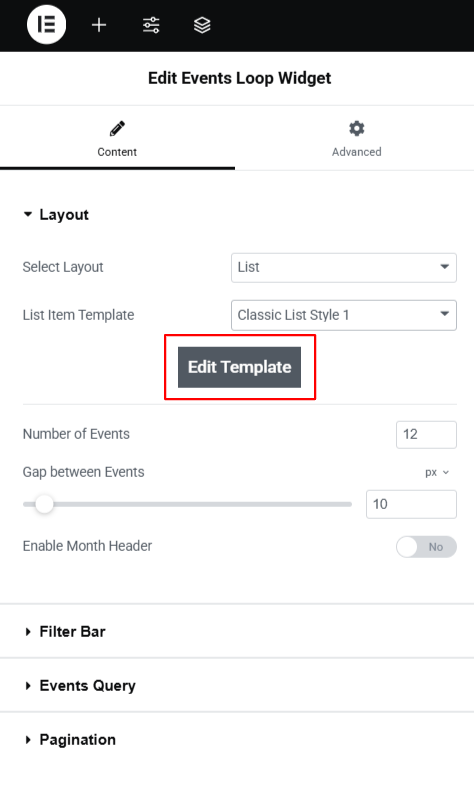
edit loop item template
  1. If you want to customize a loop item, click on the Edit Template button.
  2. This opens the Loop Item in Elementor, where you can add widgets like Event Title, Date, Image, and Button.
  3. Once you done , the widget will display the loop of events automatically.
  4. To limit the number of events shown, enter a value in the Number of Events field.

Last Updated
Events Widgets Pro

Showcase events in grids, lists, or carousels using Elementor and The Events Calendar.

Need Help? Contact Our Support Team
In This Article
Share it
Events Widgets Pro

Showcase events in grids, lists, or carousels using Elementor and The Events Calendar.

save up to 80% off

SUPER SALE

up to
80
%

off

259200

Offer
ends in:

Days
Hours
Min
Sec
Year End Sale
save up to 80% off

Offer
ends in:

Days
Hours
Min
Sec
Christmas
Special Sale

Upto

80%

OFF

Ends in

Days
Hours
Min
Sec
upto
80% off

SUPER SALE

up to
80
%

off

Offer
ends in:

Days
Hours
Min
Sec
upto
80% off

SUPER SALE

up to
80
%

off

Offer
ends in:

Days
Hours
Min
Sec
upto
80% off
Independence
Day Sale

SUPER SALE

up to
80
%

off

Offer
ends in:

Days
Hours
Min
Sec
upto
80% off

Offer
ends in:

Days
Hours
Min
Sec

SUPER SALE

up to
80
%

off

upto
80% off
Mid-Year Special Sale
save up to 80% off

Offer
ends in:

Days
Hours
Min
Sec
Summer sale
save up to 80% off

Offer
ends in:

Days
Hours
Min
Sec
WordPress Birthday Sale
Celebrate with Big Savings

Offer
ends in:

Days
Hours
Min
Sec

SUPER SALE

up to
80
%

off

upto
80% off
WordCamp Asia Celebration Sale
Made for WordPress Lovers

SUPER SALE

up to
80
%

off

Offer
ends in:

Days
Hours
Min
Sec
upto
80% off
save up to 80% off

SUPER SALE

up to
80
%

off

Offer
ends in:

Days
Hours
Min
Sec
save up to 80% off

Offer
ends in:

Days
Hours
Min
Sec
save up to 80% off

Offer
ends in:

Days
Hours
Min
Sec
save up to 80% off

SUPER SALE

up to
80
%

off

Offer
ends in:

Days
Hours
Min
Sec
New Year Sale
save up to 80% off

Offer
ends in:

Days
Hours
Min
Sec
Christmas Special Sale
Upto 80% OFF
Christmas
Special Sale

Upto

80%

OFF

Ends in

Days
Hours
Min
Sec