Events Search & Filter Bar Shortcode for The Events Calendar

The Events Search & Filter Bar allows visitors to quickly find the events they want by searching or filtering based on categories, tags, venues, or organizers. This feature makes browsing events much easier, especially when you have a large number of events listed.

Filter and Search Events using the Events Shortcodes Pro Plugin
Filter The Events Calendar Events Based on Specific Time Ranges

Enable Filter Bar

  • After adding the Events Shortcode to your page, open the filter bar settings from the block panel.
  • Switch show filter bar option to Yes to display the filter bar above your events.
  • Next, from Filter Bar Style decide how the filter bar should appear:
    • Search – Shows only the keyword search box.
    • Filters – Shows only filters (like category, tag, venue, organizer).
    • Both – Displays both keyword search and filters together.
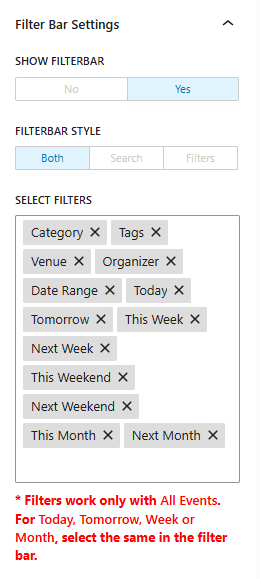
filter bar settings

Filter Options (Date, Keyword, Category)

Now, choose which filters should be available for your visitors to search events from:

  • Category – Allows visitors to filter events by event category.
  • Tags – Filters events by assigned tags.
  • Venue – Shows only events happening at a selected venue.
  • Organizer – Filters events based on the organizer’s name.
  • Date Range – Visitors can pick a custom start and end date to display events only within that range.
  • Today – Shows events happening today.
  • Tomorrow – Shows events scheduled for tomorrow.
  • This Week – Displays events happening within the current week.
  • Next Week – Displays events planned for the upcoming week.
  • This Weekend – Filters events that fall on the coming weekend.
  • Next Weekend – Shows events scheduled for the following weekend.
  • This Month – Displays all events in the current month.
  • Next Month – Displays events happening in the upcoming month.

Output:
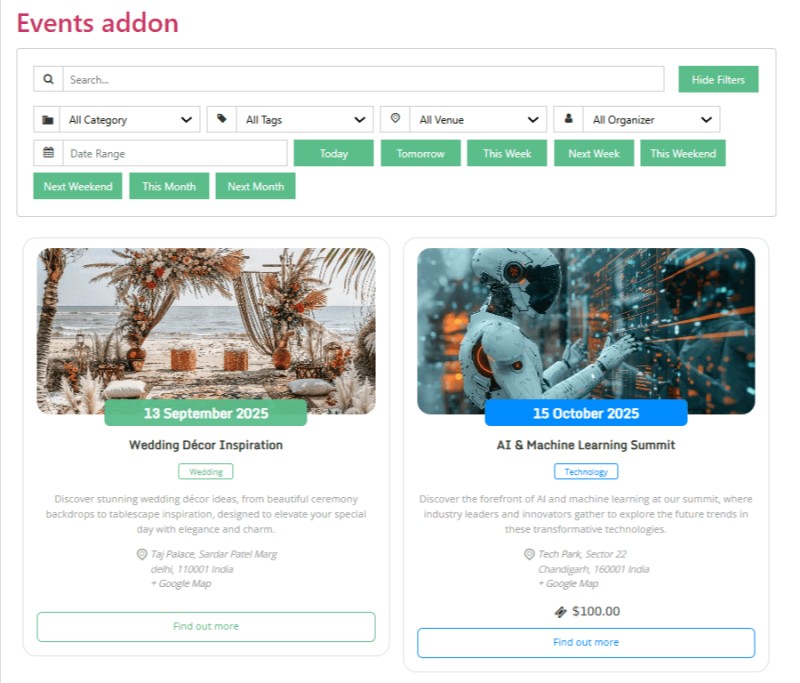
shortcode filter bar output
Last Updated
Events Shortcodes Pro

Add events anywhere on your site with flexible shortcodes.

Need Help? Contact Our Support Team
In This Article
Share it
Events Shortcodes Pro

Add events anywhere on your site with flexible shortcodes.

save up to 80% off

SUPER SALE

up to
80
%

off

259200

Offer
ends in:

Days
Hours
Min
Sec
Year End Sale
save up to 80% off

Offer
ends in:

Days
Hours
Min
Sec
Christmas
Special Sale

Upto

80%

OFF

Ends in

Days
Hours
Min
Sec
upto
80% off

SUPER SALE

up to
80
%

off

Offer
ends in:

Days
Hours
Min
Sec
upto
80% off

SUPER SALE

up to
80
%

off

Offer
ends in:

Days
Hours
Min
Sec
upto
80% off
Independence
Day Sale

SUPER SALE

up to
80
%

off

Offer
ends in:

Days
Hours
Min
Sec
upto
80% off

Offer
ends in:

Days
Hours
Min
Sec

SUPER SALE

up to
80
%

off

upto
80% off
Mid-Year Special Sale
save up to 80% off

Offer
ends in:

Days
Hours
Min
Sec
Summer sale
save up to 80% off

Offer
ends in:

Days
Hours
Min
Sec
WordPress Birthday Sale
Celebrate with Big Savings

Offer
ends in:

Days
Hours
Min
Sec

SUPER SALE

up to
80
%

off

upto
80% off
WordCamp Asia Celebration Sale
Made for WordPress Lovers

SUPER SALE

up to
80
%

off

Offer
ends in:

Days
Hours
Min
Sec
upto
80% off
save up to 80% off

SUPER SALE

up to
80
%

off

Offer
ends in:

Days
Hours
Min
Sec
save up to 80% off

Offer
ends in:

Days
Hours
Min
Sec
save up to 80% off

Offer
ends in:

Days
Hours
Min
Sec
save up to 80% off

SUPER SALE

up to
80
%

off

Offer
ends in:

Days
Hours
Min
Sec
New Year Sale
save up to 80% off

Offer
ends in:

Days
Hours
Min
Sec
Christmas Special Sale
Upto 80% OFF
Christmas
Special Sale

Upto

80%

OFF

Ends in

Days
Hours
Min
Sec